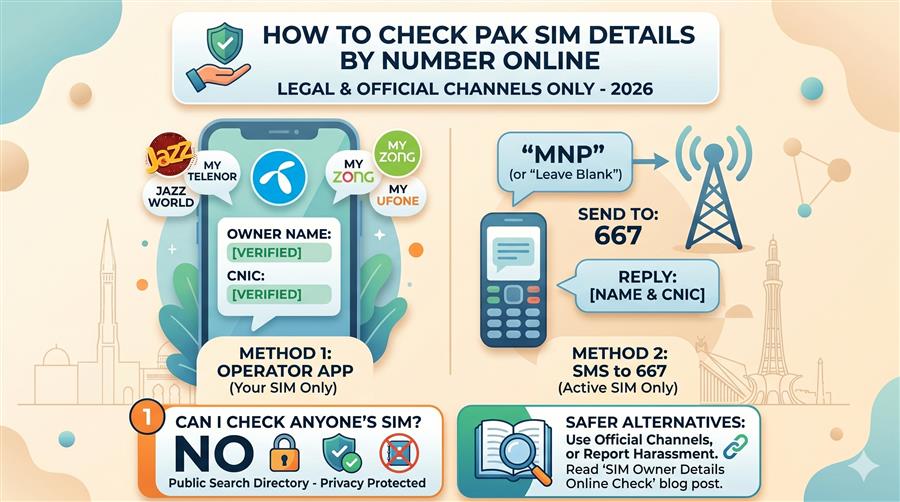
The Comprehensive Guide to the SIM Information System in Pakistan
In the digital age, a Subscriber Identity Module (SIM) card is much more than a chip that enables calls and messages; it is the link to your personal, professional, and digital identity. In Pakistan, the SIM Information System is a highly structured framework developed by the Pakistan Telecommunication Authority (PTA) in partnership with the National Database and Registration Authority (NADRA) and major telecom operators. This system regulates, monitors, and secures every active mobile connection in the country. Understanding how this system works, what data is stored, and how to verify registration details is crucial for digital security and compliance.
What is the SIM Information System?
The SIM Information System (SIS) is a central regulatory database that tracks all active SIM cards in Pakistan and links them directly to their owners' national identities. Managed under strict PTA regulations, the system co-coordinates data across the country's main telecom networks—Jazz, Telenor, Zong, Ufone, and SCOM. When you perform a check through the SIM Information System, the database returns the number of active SIM cards registered under a specific 13-digit CNIC, broken down by operator. This provides a clear, high-level summary of a citizen's registered digital footprint.
The Evolution of SIM Registration in Pakistan
The system was created in response to security challenges in the early 2000s when SIM cards could be bought without formal identity checks, which led to a rise in spam, prank calls, harassment, and digital fraud. To counter this, the PTA implemented reforms:
- CNIC-based Manual Registration (Pre-2008): Buyers had to provide a photocopy of their national ID card, which was manually entered into telecom records. This system was prone to error and forgery.
- The 789 Verification System (2008–2014): To check registration, buyers had to dial 789 and answer security questions from NADRA's database to verify their identity.
- Mandatory Biometric Verification System (2015–Present): The PTA mandated biometric fingerprint verification for all new activations and transfers. Legacy numbers without biometric verification were suspended, securing the telecom network.
What Information is Stored in a SIM Registration Record?
A SIM card record contains primary identity data and technical network identifiers:
- Owner Name: The official legal name of the registered owner matching NADRA records.
- CNIC Number: The 13-digit national identity number that anchors the registration.
- Residential Address: The permanent or temporary home address of the owner at the time of registration.
- MSISDN: The 11-digit mobile phone number (Mobile Station International Subscriber Directory Number).
- IMSI & ICCID: The unique international network identifier (International Mobile Subscriber Identity) and the physical SIM chip serial number (Integrated Circuit Card Identifier).
- Biometric Timestamp: The exact date and time the owner scanned their fingerprint for activation.
PTA SIM Limits per CNIC (Voice vs. Data SIMs)
To prevent bulk acquisitions that could be misused, the PTA limits the number of SIM cards registered to a single CNIC:
- Voice SIMs: A maximum of 5 active voice SIM cards can be registered against one CNIC at any given time, across all operators combined.
- Data-Only SIMs: In addition to voice SIMs, users can register up to 3 data-only SIM cards (for dongles, wingles, and mobile broadband devices) against their CNIC.
This means the absolute limit is 8 SIMs (5 Voice + 3 Data). If you attempt to activate a 6th voice SIM, the operator's biometric system will reject the request, and NADRA will not issue the clearance.
Direct USSD Codes to Check Your Own Number and SIM Details
To verify the number or active details of a SIM card currently inside your handset, telecom operators provide direct USSD dial codes:
| Telecom Operator | Number Check Code | Ownership Info Code | Helpline |
|---|---|---|---|
| Jazz | Dial *99# | SMS blank/MNP to 667 | 111 |
| Telenor | Dial *8888# | SMS blank/MNP to 667 | 345 |
| Zong | Dial *8# | SMS "V" to 7911 | 310 |
| Ufone | Dial *336# | SMS blank/MNP to 667 | 333 |
| SCOM | Dial *311# | SMS CNIC to 668 | 111-726-726 |
How to Verify SIM Info Online (Step-by-Step)
The SimOwner portal provides a fast, free, and secure way to look up SIM information. Follow these simple steps:
How to Handle Unauthorized SIM registrations
If you check your SIM count and find unrecognized numbers, you must block them immediately to avoid security and legal risks. Follow this de-registration guide:
- Note down the unauthorized phone numbers and their network operator.
- Visit the nearest franchise or service center of the operator (Jazz, Zong, Telenor, Ufone, SCOM) with your original CNIC.
- Request de-registration of the unauthorized number.
- Provide a biometric verification fingerprint scan. The representative will process the block, and the SIM will be suspended within 2 hours.
If you face issues blocking numbers, register a complaint with the PTA by calling their toll-free consumer helpline at 0800-55055 or submitting a complaint on the official PTA portal.
Digital Identity Protection Checklist
Preventing identity fraud is key to digital security. Follow these steps to secure your CNIC:
- Write Purposes on CNIC Photocopies: When submitting photocopies of your CNIC, draw diagonal lines across them and write the specific purpose (e.g., "For SIM registration transfer only") so they cannot be reused.
- Be Cautious of Biometric Retailers: Avoid scanning your fingerprint at unverified roadside stalls or for temporary promotions. Go to official franchises.
- Report Stolen CNICs: If your card is lost, register a police report (FIR) immediately and apply for a replacement at NADRA. Keep the FIR receipt as legal proof of loss.
- Verify Regularly: Use SimOwner or send your CNIC to 668 every 3 months to monitor registrations.