The Ultimate Guide to CNIC SIM Check and Verification in Pakistan
In Pakistan's digital era, your Computerized National Identity Card (CNIC) serves as the core anchor of your legal, financial, and digital identity. Under the regulatory framework established by the Pakistan Telecommunication Authority (PTA) and the National Database and Registration Authority (NADRA), every single mobile connection (SIM card) issued in the country must be biometrically registered to a valid CNIC. While this system has significantly reduced illegal telecom activities, it also places a major responsibility on citizens. Performing a CNIC SIM check to verify exactly how many connections are registered against your national identity is essential to protect yourself from identity theft, communication fraud, and potential legal issues.
What is a CNIC SIM Check?
A CNIC SIM check is a process that queries the central telecom subscriber database to retrieve a complete list or count of all active mobile numbers registered against a specific 13-digit national identity card number. This database is co-managed by the PTA and mobile operators, and it reflects real-time biometric registration records. When you query this system, it provides details on which mobile network operators (Jazz, Zong, Telenor, Ufone, SCOM) hold active connections under your identity. This audit helps citizens monitor whether their ID is being misused without their knowledge.
Why the CNIC SIM Check is Critical for Your Security
With the rise of digital finance and online services, SIM cards are no longer just for calling; they are keys to bank accounts, mobile wallets (JazzCash, Easypaisa), social media profiles, and government databases. Criminals and fraudsters look for ways to obtain SIM cards registered under other people's names to carry out malicious activities anonymously. The primary risks of having unauthorized SIMs registered to your CNIC include:
- Financial Liability: Fraudsters can set up mobile wallets using a SIM registered on your CNIC to receive funds from blackmail, extortion, or phishing. Law enforcement will trace the account owner back to you.
- Communication Crime: Anonymous spamming, threatening calls, and fraud are often executed using unauthorized SIMs. Under the Prevention of Electronic Crimes Act (PECA) 2016, you, as the registered owner, could face investigations and legal charges.
- Data Breaches & OTP Interception: If a hacker executes a SIM swap or registers a duplicate SIM under your CNIC, they can intercept OTP verification codes and hijack your personal accounts.
By conducting a CNIC SIM check every few months, you can detect any unrecognized numbers immediately and have them deactivated before any damage occurs.
How Many SIM Cards Can Be Registered on One CNIC?
To curb the spread of bulk SIM acquisitions and prevent identity exploitation, the PTA has set strict regulatory limits on the number of active connections a single citizen can hold. These limits are divided into two main categories:
- Voice Connections: A maximum of 5 active voice SIM cards can be registered against a single CNIC across all telecom operators combined.
- Data Connections: A user can additionally register up to 3 data-only SIM cards (used for broadband routers, dongles, and smart devices) against their CNIC.
This brings the absolute cross-network limit to 8 active SIM cards per CNIC. Note that this cap applies to individual consumers. Registered businesses, government offices, and companies can obtain corporate connections that are verified under different business verification processes.
How to Perform a CNIC SIM Check in Pakistan (Step-by-Step)
There are multiple official and verified ways to check registered SIM counts and numbers in Pakistan. Here are the step-by-step instructions for each method:
Method 1: Online via the SimOwner Portal (Free & Instant)
Our online portal offers the most convenient way to check registered numbers from any smartphone or computer:
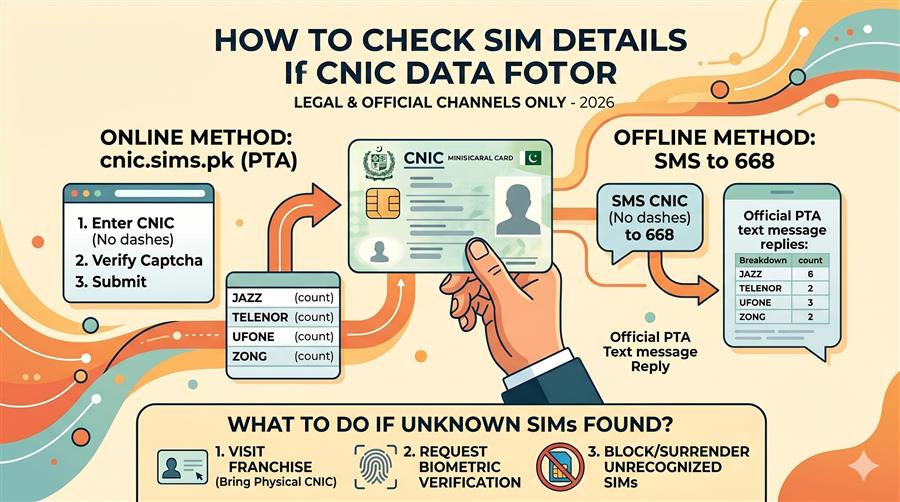
Method 2: Official PTA 668 SMS Service
If you don't have internet access, you can send an SMS directly to the PTA's database. This will return the count of registered SIMs for each network:
- Open the SMS app on your mobile device.
- Compose a new message and type your 13-digit CNIC number (without any dashes or spaces).
- Send the message to the shortcode 668.
- You will receive a response listing the count of registered SIMs for Jazz, Telenor, Zong, Ufone, and SCO. (Standard query charges of Rs. 2 + tax apply).
Method 3: Direct Operator Balance and Verification Dial Codes
To check the number or active details of a SIM card currently inside your handset, you can dial these direct USSD codes:
| Mobile Operator | Direct Number Check Code | Inquiry Shortcode | Verification Center Link |
|---|---|---|---|
| Jazz (Mobilink) | Dial *99# | SMS blank to 667 | jazz.com.pk |
| Telenor | Dial *8888# | SMS blank to 667 | telenor.com.pk |
| Zong (China Mobile) | Dial *8# | SMS "V" to 7911 | zong.com.pk |
| Ufone (PTCL) | Dial *336# | SMS blank to 667 | ufone.com |
| SCOM (AJK & Gilgit) | Dial *311# | SMS CNIC to 668 | sco.gov.pk |
How to Block Unauthorized SIM Cards Registered on Your CNIC
If your CNIC check returns unrecognized active numbers, you must block them immediately. The process is standardized across all operators in Pakistan:
- Write Down the Details: List the unauthorized phone numbers and identify the network provider for each number.
- Visit the Nearest Franchise: Go to the closest customer service center or franchise of the relevant network operator (Jazz, Zong, Telenor, Ufone, SCOM). Make sure to bring your original CNIC.
- Request De-registration: Tell the representative that there are unrecognized numbers registered under your CNIC and you want to de-register and block them.
- Provide Biometric Verification: The representative will verify your identity biometrically (thumbprint scan). Once verified, the operator will block and deactivate the numbers. The de-registration process takes about 2 to 24 hours.
If you face any issues with telecom operators or if they refuse to block unauthorized SIMs, you can submit a complaint to the PTA online through their portal or by calling their toll-free consumer helpline at 0800-55055.
Protecting Your CNIC and Biometric Identity from Fraud
Preventing unauthorized SIM registration is much easier than dealing with its consequences. Follow these practices to protect your identity:
- Avoid Sharing CNIC Photocopies Unsecured: Whenever you submit a CNIC photocopy for official use, draw diagonal lines across the photocopy and write the specific purpose (e.g., "For internet connection only"). This prevents the photocopy from being reused for SIM activation.
- Use Biometric Scanners with Caution: Never place your finger on a biometric reader at local shops or unverified promotional setups unless you are explicitly initiating a service you trust. Fraudulent agents can capture thumbprints to activate fake SIM cards.
- Report Lost Documents Immediately: If you lose your CNIC or it is stolen, register a police report (FIR) immediately. The FIR acts as your legal protection in case any illegal numbers are activated before your lost card is officially blocked by NADRA.
- Verify Regularly: Audit your CNIC SIM count every 3 to 6 months using the SimOwner online check tool or the official 668 SMS query.